NIO
什么是NIO
NIO,即new io,一个可以代替Java io的一个新的机制。这个机制极大的区别的传统的io,让程序在多线程上拥有更好的效率。我们先来看看它和传统的io有什么区别。
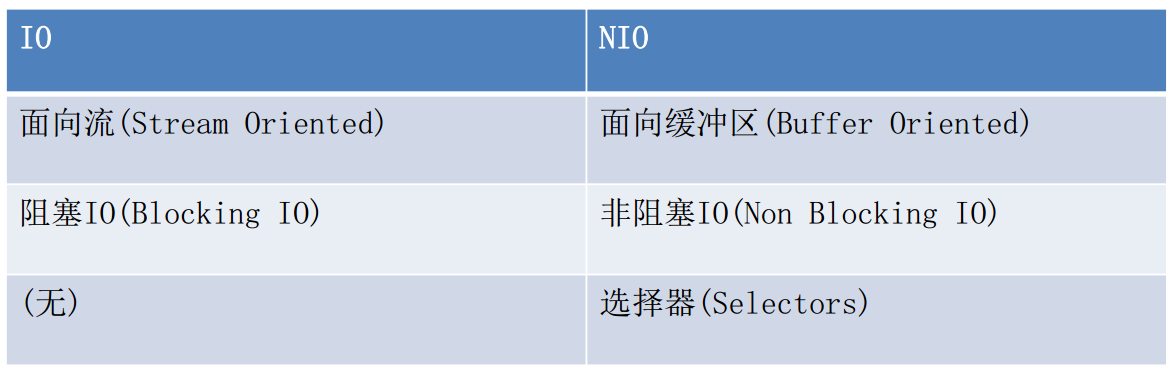
它在类型上和io不同,nio主要是一个面向缓冲区操作的,我们传统的io,都是使用着stream流的方式去读写信息,而nio则是先接收任何的值,进入到缓冲队列,再将其通过通道的方式,传递给服务器,如图。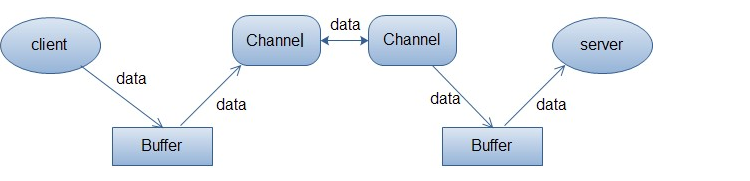
因为在buffer中,有一个叫做byteBuffer的类,能够容乃任意类型的值而不改变,能将一个buffer加入到通道中进行传输。回过头来看,传统的io对于处理客户传进来的一个信息,会分出一个线程去进行io操作。而nio不一样,这就要关系到选择器了,nio只使用一个线程去管理客户传进来的信息,每当客户有信息传入时,选择器会给这个信息先分一个类,分成需要进行io操作的一类,和不需要进行io操作的一类。这样会使需要io操作的一类才进行io函数去处理,这在宏观上,有什么区别呢?举一个例子,你在逛淘宝店铺,当你点击进去一个店铺的时候,就向服务器传达了一个信息,表示客户您在线,而传统的io则直接分给你一个线程,你的所有购买商品的操作,都会在这个线程中完成,而我们的nio呢,则不会直接分发线程给你,而是接收你的所有操作,并把需要io和不需要的io的操作分开来,这样,就不会长时间的去占用系统资源。而我们的通道(channel),则在这个时候起到了极大的作用: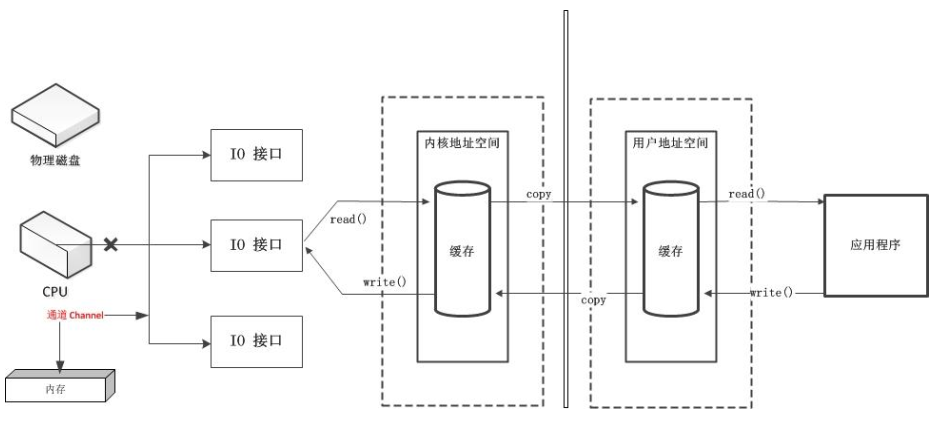
因为每一次启动io连接,都需要cpu去处理和调度,但是反反复复的使用cpu去开启和关闭io连接,无疑是一个极大的浪费,所以便使用了通道这一个技术,将io的数据使用buffer缓冲保存起来,并且通过通道去发送缓冲,这样效率便有了提升。
说到nio,也一下socket,是操作系统提供给通信层的一组抽象API接口。因为socket的存在,才能让两个进程实现通信。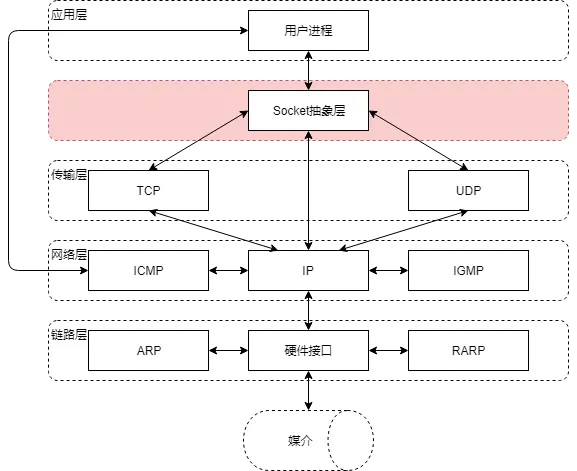
socket在计算机网络中,起到至关重要的地步,正是因为socket的存在,才使得数据连接起来,我们来看看socket是如何在客户端和服务器之间通信的。
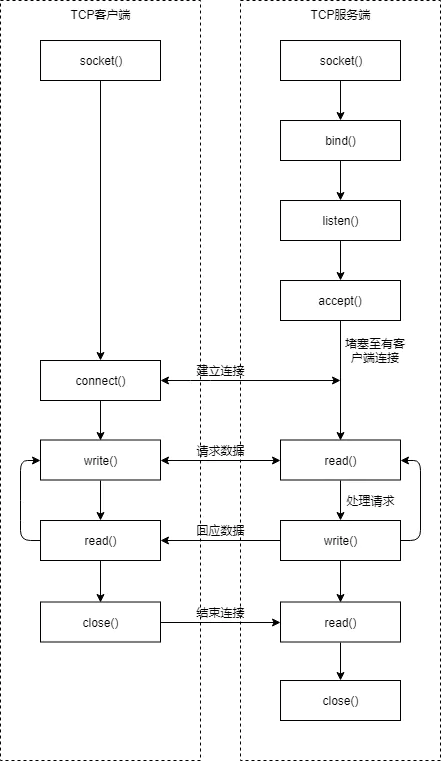
服务端首先初始化socket(),然后与端口绑定bind(),再对端口进行监听listen(),接着调用accept()堵塞等待客户端连接。此时,若有一个客户端初始化了一个Socket,然后连接服务端connect()。若连接成功,此时客户端与服务端的连接就建立了。客户端发送请求write(),服务端接收请求并处理read(),然后将回应发送给客户端write(),客户端读取数据read(),最后关闭连接close(),一次交互结束。
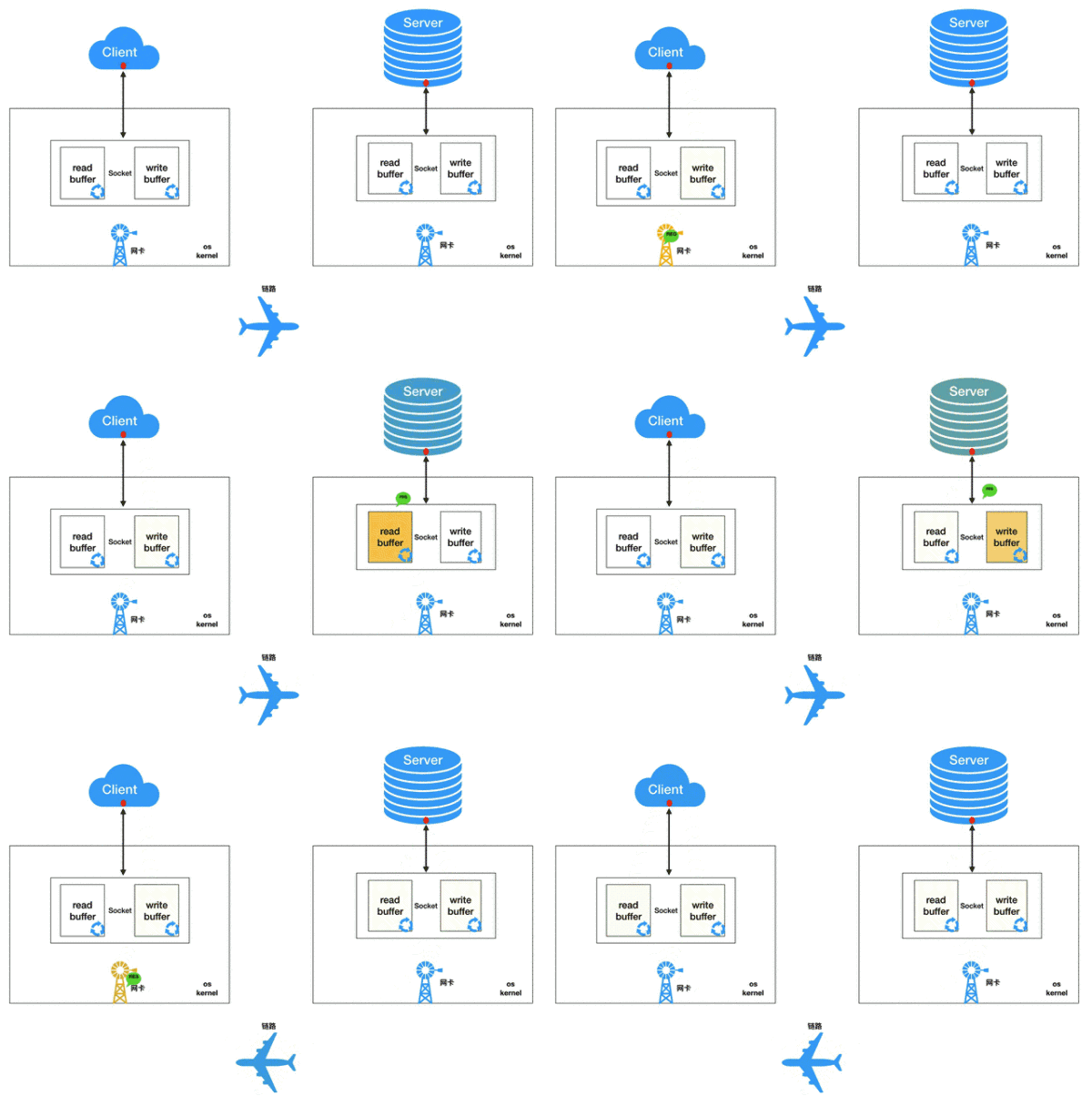
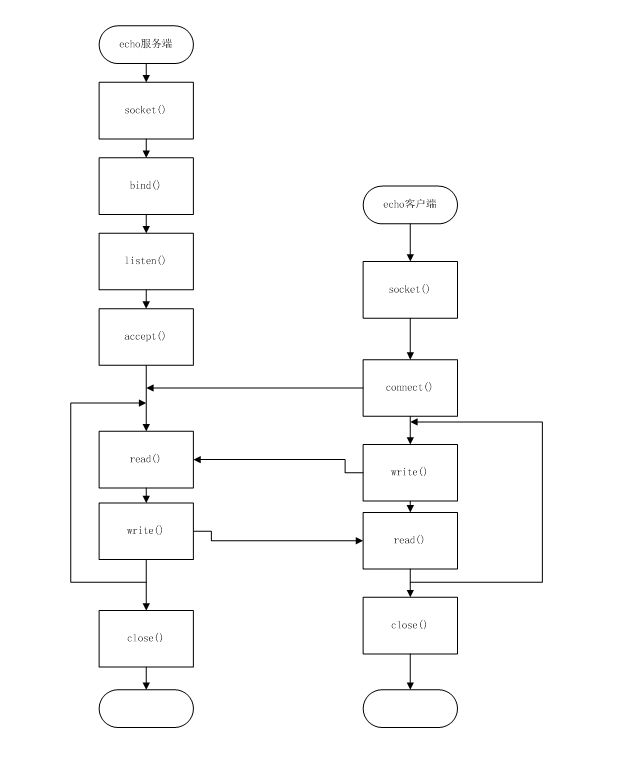
在这之后,我们使用socket来制作一个简单的echo服务器吧。echo服务器很简单,它在客户单读取的所有数据,都会原封不动的传输给服务端。
参考资料:
https://www.cnblogs.com/pony1223/p/8138233.html
https://www.jianshu.com/p/01b9a454de5a
https://blog.csdn.net/weibo1230123/article/details/81951731
基于Socket的echo服务器
这个服务器逻辑较为简单,就是从客户端接收到什么,就再次向客户端发送什么,这次先使用普通的io流进行编程。
1
2
3
4
5
6
7
8
9
10
11
12
13
14
15
16
17
18
19
20
21
22
23
24
25
26
27
28
29
30
31
32
33
34
35
36
37
38
39
40
41
42
43
44
45
46
47
48
49
50
51
52
53
54
55
56
57
58
59
60
61
62
63
64
65
66
67
68
69
70
71
72
73
74
75
76
77
78
79
80
81
82
83
84
85
86
87
88
89
90
91
92
93
94
95
96
97
98
99
100
101
102
103
104
105
106
107
108
109
110
111
112
113
114
| import java.io.BufferedReader;
import java.io.IOException;
import java.io.InputStreamReader;
import java.io.PrintWriter;
import java.net.ServerSocket;
import java.net.Socket;
import java.util.concurrent.ExecutorService;
import java.util.concurrent.Executors;
public class echo服务器 {
private static ExecutorService es= Executors.newCachedThreadPool();
public static void main(String[] args) {
ServerSocket echo=null;
Socket client=null;
try {
echo=new ServerSocket(8000);
} catch (IOException e) {
System.out.println(e);
}
while (true){
try {
client=echo.accept();
System.out.println("客户端地址:"+client.getRemoteSocketAddress()+" 发起了连接");
es.execute(new HandleMsg(client));
} catch (IOException e) {
System.out.println(e);
}
}
}
static class HandleMsg implements Runnable{
Socket clientSocket;
public HandleMsg(Socket socket) {
this.clientSocket = socket;
}
@Override
public void run() {
BufferedReader is=null;
PrintWriter os=null;
try {
is =new BufferedReader(new InputStreamReader(clientSocket.getInputStream()));
os=new PrintWriter(clientSocket.getOutputStream(),true);
String input=null;
long start=System.currentTimeMillis();
while ((input=is.readLine())!=null){
os.println(input);
}
long end=System.currentTimeMillis();
System.out.println("花费时间:"+(end-start)+"ms");
} catch (IOException e) {
e.printStackTrace();
}finally {
try {
if (is!=null)is.close();
if (os!=null)os.close();
} catch (IOException e) {
e.printStackTrace();
}
}
}
}
}
import java.io.BufferedReader;
import java.io.IOException;
import java.io.InputStreamReader;
import java.io.PrintWriter;
import java.net.InetSocketAddress;
import java.net.Socket;
public class 客户端A{
public static void main(String[] args) throws IOException {
Socket client=null;
PrintWriter writer=null;
BufferedReader reader=null;
try {
client=new Socket();
client.connect(new InetSocketAddress("localhost",8000));
writer=new PrintWriter(client.getOutputStream(),true);
writer.println("hello!");
writer.flush();
reader=new BufferedReader(new InputStreamReader(client.getInputStream()));
System.out.println("来自于服务器:"+reader.readLine());
} catch (IOException e) {
e.printStackTrace();
} finally {
if (writer!=null)writer.close();
if (reader!=null)reader.close();
if (client!=null)client.close();
}
}
}
|
如此一来便完成了一个简单的服务器。但是,这样的io型服务器,在实际使用中,往往不尽人意,因为你可以从结构看到,它在对服务器有着硬性要求的条件下,对客户端的要求也不低,为什么这么说呢?因为每次的任务提交,都需要进行一段时间的阻塞,假如在我们的客户端网络状况及其不好,那么对服务端来说,也有着极大的影响。举个例子:
1
2
3
4
5
6
7
8
9
10
11
12
13
14
15
16
17
18
19
20
21
22
23
24
25
26
27
28
29
30
31
32
33
34
35
36
37
38
39
40
41
42
43
44
45
46
47
48
49
50
51
52
53
54
55
56
57
58
59
60
61
62
63
64
65
66
67
68
69
70
71
72
73
74
75
76
77
78
79
80
81
82
83
84
85
86
87
88
89
| import java.io.BufferedReader;
import java.io.IOException;
import java.io.InputStreamReader;
import java.io.PrintWriter;
import java.net.InetSocketAddress;
import java.net.Socket;
import java.util.concurrent.ExecutorService;
import java.util.concurrent.Executors;
import java.util.concurrent.locks.LockSupport;
public class 客户端B {
private static ExecutorService es= Executors.newCachedThreadPool();
private static final int sleeptime=1000*1000*1000;
public static class EchoClient implements Runnable{
@Override
public void run() {
Socket client=null;
PrintWriter writer=null;
BufferedReader reader=null;
try {
client =new Socket();
client.connect(new InetSocketAddress("localhost",8000));
writer=new PrintWriter(client.getOutputStream(),true);
writer.print("H");
LockSupport.parkNanos(sleeptime);
writer.print("e");
LockSupport.parkNanos(sleeptime);
writer.print("l");
LockSupport.parkNanos(sleeptime);
writer.print("l");
LockSupport.parkNanos(sleeptime);
writer.print("o");
LockSupport.parkNanos(sleeptime);
writer.print("!");
LockSupport.parkNanos(sleeptime);
writer.println();
writer.flush();
reader=new BufferedReader(new InputStreamReader(client.getInputStream()));
System.out.println("来自于服务器:"+reader.readLine());
} catch (IOException e) {
e.printStackTrace();
}finally {
try {
if (writer!=null)writer.close();
if (reader!=null)reader.close();
if (client!=null)client.close();
} catch (IOException e) {
e.printStackTrace();
}
}
}
}
public static void main(String[] args) {
EchoClient ec=new EchoClient();
for (int i = 0; i <10 ; i++) {
es.execute(ec);
}
es.shutdown();
}
}
|
可以看到,当我们的客户端网络状态很差的时候,我们的服务器状态也变的很差,服务器在等待客户端传输完数据的这六秒之内,是不能够做任何事情的,换句话说,属于服务器的性能,都用于等待你网络传输完数据。这表示你的多核服务器,将会有极大的资源浪费在这里。因此,NIO顺应而生了,NIO就是为了解决这样的问题而来,通过缓冲和通道交换的形式,NIO的选择器能够将需要读写的线程标记出来,让服务器在等待的过程中,还能去计算其他的事务。
使用NIO在构建echo服务器
在NIO中,之前也提到过channel(通道),这个channel可以看作为socket。而向channel中传达buffer,就等于向socket中传达流,buffer和流不同的地方在于,buffer不会被阻塞,因为它仅是一个数据队列。而每一个channel中都有一个叫做selectablechannel,它被selector(选择器)所管理者。而selector可以被一个线程管理,也可以被多个线程管理,每当channel准备好数据时,selector就会得到通知,去处理这一些数据。那么,我们就来重新实现一下echo服务器吧。
1
2
3
4
5
6
7
8
9
10
11
12
13
14
15
16
17
18
19
20
21
22
23
24
25
26
27
28
29
30
31
32
33
34
35
36
37
38
39
40
41
42
43
44
45
46
47
48
49
50
51
52
53
54
55
56
57
58
59
60
61
62
63
64
65
66
67
68
69
70
71
72
73
74
75
76
77
78
79
80
81
82
83
84
85
86
87
88
89
90
91
92
93
94
95
96
97
98
99
100
101
102
103
104
105
106
107
108
109
110
111
112
113
114
115
116
117
118
119
120
121
122
123
124
125
126
127
128
129
130
131
132
133
134
135
136
137
138
139
140
141
142
143
144
145
146
147
148
149
150
151
152
153
154
155
156
157
158
159
160
161
162
163
164
165
166
167
168
169
170
171
172
173
174
175
176
177
178
179
180
181
182
183
184
185
186
187
188
189
190
191
192
193
194
195
196
197
198
199
200
201
202
203
204
205
206
207
208
209
210
211
212
213
214
215
216
217
218
219
220
221
222
223
224
225
226
227
228
229
230
231
232
233
234
235
236
237
238
239
240
| import java.io.IOException;
import java.net.InetAddress;
import java.net.InetSocketAddress;
import java.net.Socket;
import java.nio.ByteBuffer;
import java.nio.channels.SelectionKey;
import java.nio.channels.Selector;
import java.nio.channels.ServerSocketChannel;
import java.nio.channels.SocketChannel;
import java.nio.channels.spi.SelectorProvider;
import java.util.*;
import java.util.concurrent.ExecutorService;
import java.util.concurrent.Executors;
public class 使用NIO来实现服务器 {
private Selector selector;
private ExecutorService es= Executors.newCachedThreadPool();
public static Map<Socket,Long> time_start=new HashMap<Socket, Long>(10240);
private void startServer() throws IOException {
selector= SelectorProvider.provider().openSelector();
ServerSocketChannel ssc=ServerSocketChannel.open();
ssc.configureBlocking(false);
InetSocketAddress isa=new InetSocketAddress(8000);
ssc.socket().bind(isa);
SelectionKey key=ssc.register(selector,SelectionKey.OP_ACCEPT);
for (;;){
selector.select();
Set readyKeys=selector.selectedKeys();
Iterator i=readyKeys.iterator();
long e=System.currentTimeMillis();;
while (i.hasNext()){
SelectionKey sk=(SelectionKey) i.next();
i.remove();
if (sk.isAcceptable()){
doAccept(sk);
}
else if (sk.isValid()&&sk.isReadable()){
if (!time_start.containsKey(((SocketChannel)sk.channel()).socket())) {
time_start.put(((SocketChannel)sk.channel()).socket(),
System.currentTimeMillis());
}
doRead(sk);
}
else if (sk.isValid()&&sk.isWritable()){
doWrite(sk);
long b=time_start.remove(((SocketChannel)sk.channel()).socket());
System.out.println("花费时间:"+(e-b)+"ms");
}
}
}
}
private void doAccept(SelectionKey sk){
ServerSocketChannel server=(ServerSocketChannel)sk.channel();
SocketChannel clientChannel;
try {
clientChannel=server.accept();
clientChannel.configureBlocking(false);
SelectionKey clientKey=clientChannel.register(selector,SelectionKey.OP_READ);
EchoClient ehco=new EchoClient();
clientKey.attach(ehco);
InetAddress clientAddress=clientChannel.socket().getInetAddress();
System.out.println("数据连接来自于:"+clientAddress.getHostAddress()+".");
} catch (IOException e) {
System.out.println("接收新客户失败");
e.printStackTrace();
}
}
private void doRead(SelectionKey sk){
SocketChannel channel=(SocketChannel)sk.channel();
ByteBuffer byteBuffer=ByteBuffer.allocate(8192);
int length;
try {
length=channel.read(byteBuffer);
if (length<0){
disconnect(sk);
return;
}
} catch (IOException e) {
System.out.println("接收新客户失败");
disconnect(sk);
e.printStackTrace();
return;
}
byteBuffer.flip();
es.execute(new HandleMsg(sk,byteBuffer));
}
private void disconnect(SelectionKey sk) {
}
private void doWrite(SelectionKey sk){
SocketChannel channel =(SocketChannel) sk.channel();
EchoClient echo=(EchoClient) sk.attachment();
LinkedList<ByteBuffer> data=echo.getData();
ByteBuffer byteBuffer=data.getLast();
try {
int length =channel.write(byteBuffer);
if (length==-1){
disconnect(sk);
return;
}
if (byteBuffer.remaining()==0){
data.removeFirst();
}
} catch (IOException e) {
System.out.println("接收新客户失败");
disconnect(sk);
e.printStackTrace();
}
if (data.size()==0){
sk.interestOps(SelectionKey.OP_READ);
}
}
public class HandleMsg implements Runnable {
SelectionKey sk;
ByteBuffer byteBuffer;
public HandleMsg(SelectionKey sk, ByteBuffer byteBuffer) {
this.sk = sk;
this.byteBuffer = byteBuffer;
}
@Override
public void run() {
EchoClient ehco=(EchoClient) sk.attachment();
ehco.enqueue(byteBuffer);
sk.interestOps(SelectionKey.OP_READ | SelectionKey.OP_WRITE);
selector.wakeup();
}
}
public class EchoClient {
private LinkedList<ByteBuffer> data;
EchoClient(){
data=new LinkedList<ByteBuffer>();
}
public LinkedList<ByteBuffer> getData(){
return data;
}
public void enqueue(ByteBuffer byteBuffer){
data.addFirst(byteBuffer);
}
}
public static void main(String[] args) {
使用NIO来实现服务器 echoServer = new 使用NIO来实现服务器();
try {
echoServer.startServer();
} catch (Exception e) {
}
}
}
|
需要表达的都写了注释,在此不过多赘述。我们可以比较直观的看到,即使客户端出现的网络的延迟,也不会给服务器带来太大的问题,服务器只会在接收完客户端数据后再开启线程进行处理,而不是直接就分发线程给客户端。这里最关键的角色,还是selector(选择器)。
使用NIO来构建客户端
上面使用了NIO来构建echo服务器,但还是用socket来构建的客户端。因此,我们可以使用NIO去重新构建一下客户端。
1
2
3
4
5
6
7
8
9
10
11
12
13
14
15
16
17
18
19
20
21
22
23
24
25
26
27
28
29
30
31
32
33
34
35
36
37
38
39
40
41
42
43
44
45
46
47
48
49
50
51
52
53
54
55
56
57
58
59
60
61
62
63
64
65
66
67
68
69
70
71
72
73
74
75
76
77
78
79
80
81
82
83
| import java.io.IOException;
import java.net.InetSocketAddress;
import java.nio.ByteBuffer;
import java.nio.channels.SelectionKey;
import java.nio.channels.Selector;
import java.nio.channels.SocketChannel;
import java.nio.channels.spi.SelectorProvider;
import java.util.Iterator;
public class 客户端C {
private Selector selector;
public void init(String ip,int port) throws IOException {
SocketChannel channel=SocketChannel.open();
channel.configureBlocking(false);
this.selector= SelectorProvider.provider().openSelector();
channel.connect(new InetSocketAddress(ip,port));
channel.register(selector, SelectionKey.OP_CONNECT);
}
public void working() throws IOException {
while (true){
if (!selector.isOpen()){
break;
}
selector.select();
Iterator<SelectionKey> i=this.selector.selectedKeys().iterator();
while (i.hasNext()){
SelectionKey key=i.next();
i.remove();
if (key.isConnectable()){
connect(key);
}else if (key.isReadable()){
read(key);
}
}
}
}
private void connect(SelectionKey key) throws IOException {
SocketChannel channel=(SocketChannel)key.channel();
if (channel.isConnectionPending()){
channel.finishConnect();
}
channel.configureBlocking(false);
channel.write(ByteBuffer.wrap(new String("hello server!\r\n").getBytes()));
channel.register(this.selector,SelectionKey.OP_READ);
}
private void read(SelectionKey key) throws IOException {
SocketChannel channel=(SocketChannel) key.channel();
ByteBuffer byteBuffer=ByteBuffer.allocate(100);
channel.read(byteBuffer);
byte[] data=byteBuffer.array();
String msg=new String(data).trim();
System.out.println("客户端收到的信息为:"+msg);
channel.close();
key.selector().close();
}
public static void main(String[] args) throws IOException {
客户端C t=new 客户端C();
t.init("localhost",8000);
t.working();
}
}
|
如此一来,便使用NIO实现了这个客户端C。可以看到,在使用NIO重构的过程中,不仅使得服务器和客户端有了更多优化,而且对于代码的复杂程度,也有着显著的减少。
不过,NIO虽然提供了不同于IO的阻塞策略,使得服务器得到优化,但是,NIO本身的IO行为,仍然是同步的,也就是说,也是在IO都准备好了之后,再去通知线程。那有没有方法可以先让IO操作完成后,再去通知线程呢?当然有,那就是AIO(Asynchronized),一种异步的IO方式。